Throw things into your library from your phone, the web, email or an AI assistant. Find what you kept, share its address, make pages and let your tools work with what you allow.
Keep map.name close.
A photo, a link, a thought. Give map.name a place on your phone, ready when something is worth keeping.
Shortcut availability depends on your app version and phone. If an option is missing, use Share → map.name.
Press and hold the app icon.
On your Home Screen, touch and hold the map.name app icon.
Choose Camera for a photo, Write for a thought, Speak to dictate, or Search to find something you kept.
map.name
Camera
Write
Speak
Search
Illustration of the app-icon menu on iPhone and Android. Press and hold the icon on your Home Screen, outside the app.
On Android, app shortcuts need Android 7.1 or later and a supporting launcher. You can also drag a shortcut onto your Home Screen if your launcher supports it.
iPhone & iPadShare, a widget, or Control Center
Keep something from another app
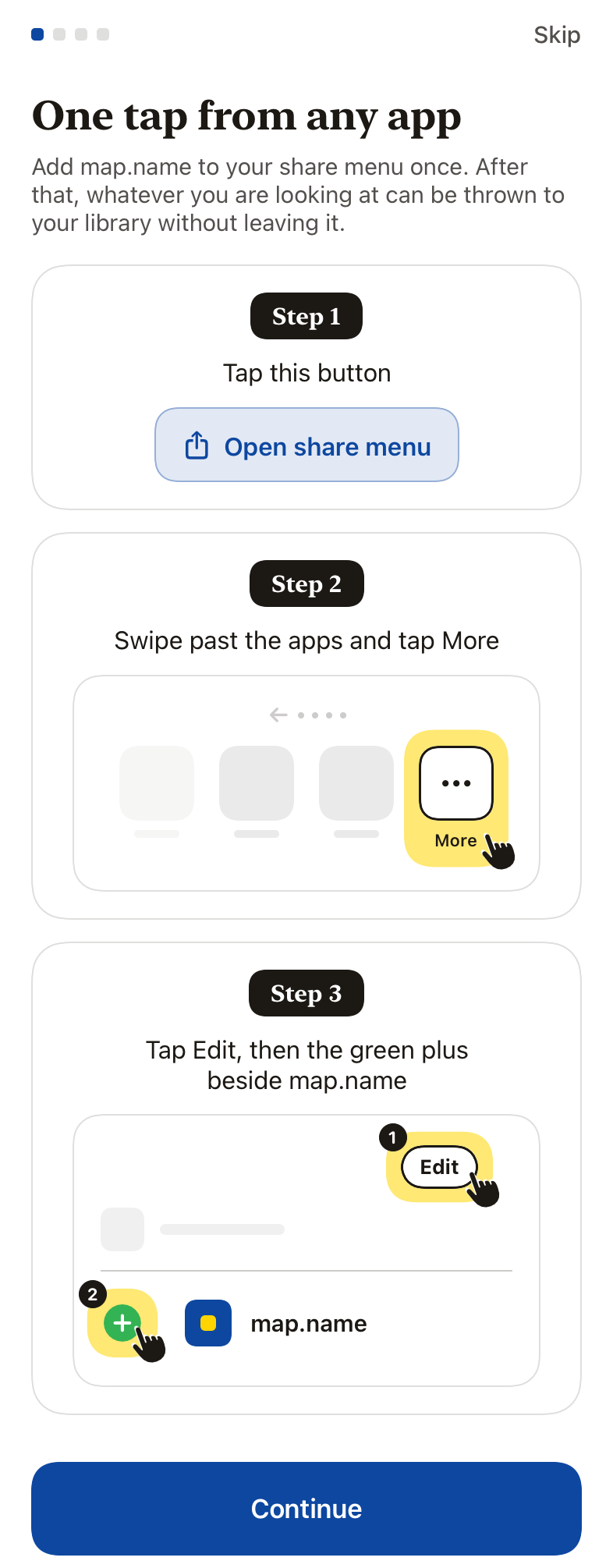
Open the share menu in any app.
Swipe past the apps and tap More.
Tap Edit, then the green plus beside map.name. After that, choose map.name from the share menu whenever you want to throw.
For a throw with no second screen, choose Save to map.name in the actions list below the apps. Enable it once under Edit Actions…. Pictures (up to 250), links, text, Safari pages and .pkpass tickets can come through the share menu.
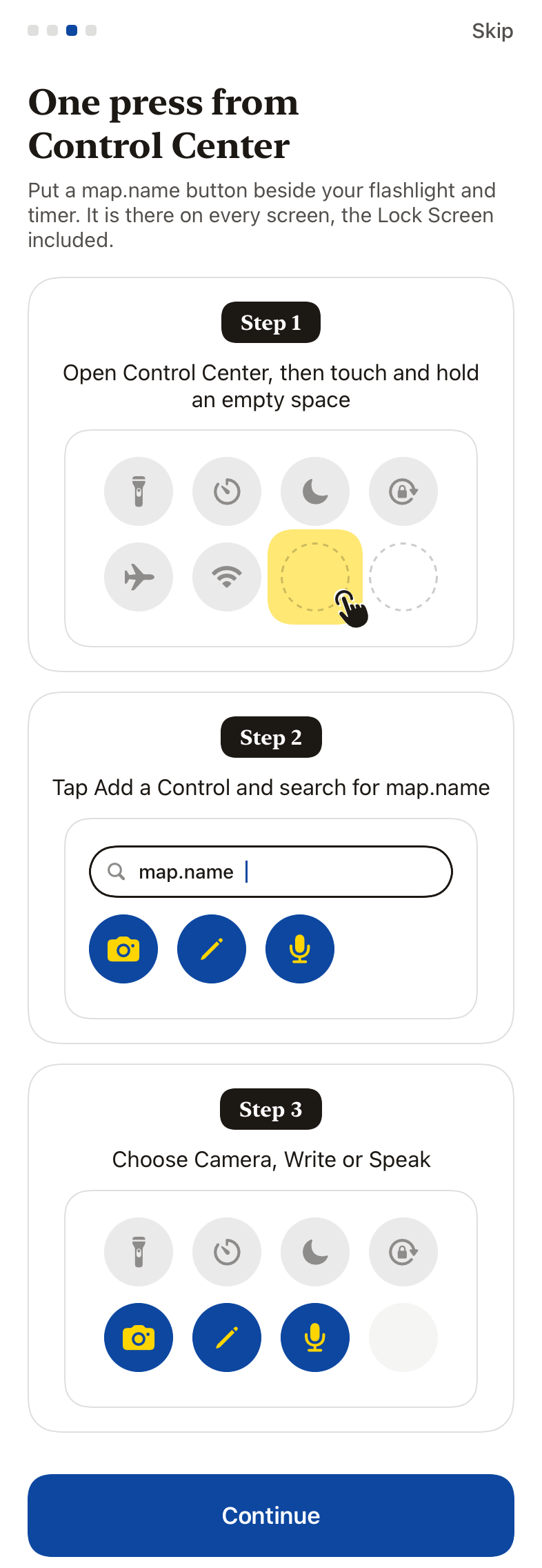
See the iPhone share-menu stepsIllustrations from the iOS app. Example content only.See the iPhone Control Center stepsIllustrations from the iOS app. Example content only.
A quicker way to catch a moment
Illustration, not a screenshot. The Throw widget and Camera control open the camera; nothing is kept until you choose to throw it.
Lock Screen widget
iPhone · iOS 16 or later
Touch and hold your Lock Screen, tap Customise, then choose Lock Screen.
Tap the widget area below the clock, find map.name, and add Throw.
Tap Done. The widget opens the camera when you need it.
Home Screen widget
iOS or iPadOS 16 or later
Touch and hold an empty part of your Home Screen, then open Add Widget (under Edit on newer versions).
Search for map.name, choose Throw, and add it to your Home Screen.
Control Center
iOS or iPadOS 18 or later
Open Control Center, touch and hold an empty area, then tap Add a Control.
Find map.name and add Camera. Tap it to open the camera.
You can also add Write for a private thought or Speak to start dictation.
Find it from iPhone search
Opt in · recent catches on this phone only
In Account, turn on Find recent catches in iPhone search.
Swipe down on your Home Screen and type a word. Only text from recent catches loaded on this phone is included; protected catches stay out.
Turning this off or signing out removes these results. Use Search from the app icon for your whole library.
Siri and Shortcuts
iOS 16.4 or later
Use Save to map.name in Shortcuts, or say Save to map.name to Siri.
It opens the app at the camera and offers a link you just copied. It does not silently keep anything by voice.
Open map.name and sign in once. Control Center and Lock Screen controls ask you to unlock before the app opens. In the app, **Quick ways in** shows these steps again.
AndroidShare, a Home Screen widget, or a tile
Keep something from another app
Open the share menu in any app.
Choose map.name. It is in the list as soon as the app is installed.
To keep it near the front, touch and hold map.name in the share menu and pin it. The wording varies by phone.
Throw pictures, links, text and .pkpass tickets through the share menu. Every throw starts private. Unlike iPhone, Android needs no separate action to be enabled.
Put your favourite way within reach
Illustration, not a screenshot. The camera shortcut and Throw tile open the camera; Write opens a new note and Search opens your library search.
Home Screen widget
Android 7 or later
Touch and hold an empty part of your Home Screen and choose Widgets.
Find map.name, then drag its widget onto your Home Screen.
Use the camera, Write, or search button to go straight to what you need.
Quick Settings tile
Android 7 or later
Swipe down from the top of the screen to open Quick Settings fully, then tap Edit (often a pencil).
Find Throw among the available tiles and drag it into your active tiles.
Tap Throw whenever you want to open the camera.
Open map.name and sign in once. Quick Settings asks you to unlock before the camera opens. Names and placement vary by phone and launcher.
The throw
Throwing is the only thing you ever have to do. There are no folders to create, no tags to maintain, no filing. Everything arrives private by default, and you can throw from wherever you already are.
iPhone & iPad · share to the app
Share from any app and pick map.name in the app row. Add a note if you want one, then tap Throw to map.name to keep it privately. You can change its visibility afterwards.
iPhone & iPad · the one-tap throw
In the same share sheet, scroll the actions list below the app icons and tap Throw to map.name. No sheet, no questions, it throws privately and closes. The first time, tap Edit Actions at the bottom of that list and add it to your favourites so it sits one tap away.
iPhone & iPad · inside the app
Open map.name and use the camera, write or dictate a note, or import. Everything works offline and sends when you are back.
Android · inside the app
Open map.name and use the camera, write or dictate a note, or share to map.name from any app. Everything works offline and sends when you are back.
Browser extension (Chrome, Edge, Firefox)
Right-click any page, link, image or selected text and it lands in your map.name in a second. It works on Windows and Linux too.
Mac shortcut
One global hotkey throws selected text from any app. The purest throw the desktop allows.
Import your old stuff
On the import page, drop a file anywhere or click to choose. Browser bookmarks (one click through the extension, or a bookmarks .html), Readwise, Raindrop, Pocket or Kindle exports, or any list of links. Or drop a whole Google Takeout.zip in one go. Your Google Maps saved places land as real pins on your map, your Chrome bookmarks and YouTube likes become searchable catches, and passive history is skipped.
The catch
Seconds later it is back with a title, one line in your words if you gave them, and the useful bits: dates, places, prices, phone numbers, codes.
Email, assistants and the API
Throw mail to you@map.name. Only senders you approve get through. Reply from Messages, and keep a letter and its attachments when you want them in your library.
Connect an assistant on For agents, or throw from your own tools with the API. Everything starts private.
Private, Link only, Public
Private: only you and the people and assistants you allow.
Link only: anyone with the link key. Rotate the key and old links stop working.
Public: anyone can read it without an account. Choose the exact blocks you share; private sources stay behind. Change visibility or withdraw a page at any time.
Everything has an address
Every catch and page has its own address, such as map.name/you.0k6zq. Say the code, paste the address or print its QR code. Addresses are never reused for a different thing.
Make your page your own
Your accent colour, mark, bio, section order and profile photo are yours to choose, free. Open Customize my page in your account menu.
People and assistants, within what you allow
Invite people or connect an assistant to read, add and edit only what you allow. Assistants can use a code such as 0k6zq, keep a session’s plan current, and reply beside your comments at the same address.
Connect at https://map.name/mcp. Chat apps connect by signing in; coding tools can use a key. An app that signs in throws only into your own library, never to other people. Without either, it reads public libraries only. Choose your tool on For agents.
Leaving is free
Export your catches, pages and notes as JSON in one click. Your words stay word for word, and export is free.